


Cengage Read
3.6349.00 Reviews
App Specs
- Version
- 2.0
- Updated On
- License
- Free
- Downloads
- 100,000+
- Developer
- Cengage Learning
- Categories
- Education
- Platform
- Android
Screenshots


 Analysis by AppCompare
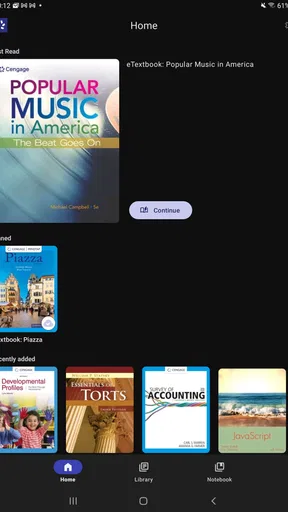
I found Cengage Read most useful when I treated it as a focused study shelf rather than a complete learning platform. The app is designed for reading Cengage eTextbooks on the go, so its value depends heavily on whether your course materials already belong to the Cengage ecosystem. If they do, having those books available on a phone or tablet can make short study sessions much easier to fit into a busy day.
My first impression was practical rather than flashy. This is an education app from Cengage Learning, and the central idea is straightforward: open your digital textbook, continue reading, and use spare moments for coursework. It is free to install, carries an Everyone age rating, and has reached over 100 thousand installs. Those details make it approachable for students, families sharing a tablet, and anyone who wants to test the reading experience without paying for another app.
At the same time, I would not recommend downloading it simply because you need “a study app.” Cengage Read is not a general note-taking tool, flashcard system, language course, or homework planner. Its strongest use is more specific: accessing assigned Cengage reading when carrying a physical textbook is inconvenient. That narrow purpose is also its main limitation.
How Cengage Read fits into real study routines
I find Cengage Read works best when a study session has a clear destination, rather than being opened just to browse. In this section, I focus on how to turn a spare moment into a useful reading habit and how to keep the app’s role distinct from the tools you may use for notes or revision. That makes it easier to decide what a good first session should accomplish.
A shared tablet can become a useful study station
A realistic household example is a student who leaves a textbook at school or in a backpack while a family tablet stays at home. With Cengage Read available, the student can read a chapter at the kitchen table, on the sofa, or during a quiet wait without moving a heavy book around. Another person can use the same device later for ordinary household tasks, provided the student signs out or otherwise keeps the reading session separate when needed.
I like this kind of shared-device use because it treats the app as a portable textbook, not as a social service. A parent does not need to understand the subject to help create a study window. They can simply make the tablet available, keep the screen comfortable, and let the student work through the assigned material. That simplicity is more useful than a crowded interface when the immediate goal is reading.
There is a trade-off, however. Shared hardware does not automatically mean shared accounts should be mixed together. If several learners use the same tablet, each person should be careful about which account is active before opening course material. I would make that check part of the routine, especially when one student’s textbook could be confused with another student’s course access.
Worth Reading Before You Choose

EA SPORTS FC Mobile 26 Is a Bigger Football Game, but It Takes Time

Flipboard Shows What News Apps Must Do Beyond the Feed

Switching to Android Auto Means Rethinking Your Driving Routine

Google Calendar Makes a Crowded Week Easier to Manage

Ludo King Makes the Most of the Minutes Between Plans

Baby Panda World Brings Quick Play to Modern Phones, but Its Game Library Feels Busy
The app also makes sense for a student who studies in short bursts. Ten or fifteen minutes spent reading a section can be worthwhile when the alternative is waiting until there is enough time to sit down with a full book. I found this approach particularly sensible for reviewing a previous chapter before class, checking a definition before starting an assignment, or refreshing a concept while away from a desk.
What setup should happen before the first serious session
Before relying on Cengage Read for an important deadline, I would open it at home and confirm that the intended eTextbook is available. That small test prevents an awkward situation in which a student discovers during a commute or study break that the wrong account is active, the expected title is not visible, or the reading material needs attention before it can be used comfortably.
Account boundaries deserve special attention in a household. I would avoid handing a shared device to another person while leaving my academic account open, particularly if the device is used by younger children. Even without inventing special family controls, ordinary habits help: close the app when finished, check the account before beginning, and avoid saving personal login details where other users can casually access them.
For a student, the best setup is usually a dedicated reading routine. Keep the device charged, adjust the screen so long passages are comfortable, and place the app somewhere easy to find. These are simple steps, but they matter because digital textbooks compete with messages, games, browsers, and streaming apps. Cengage Read can put the book within reach; it cannot create concentration by itself.
I would also decide in advance whether the phone is the right screen. A phone is convenient for a quick reference or a few pages, but a tablet is more comfortable for extended reading because the page has more room. That distinction changes how I judge the app. On a small screen, the experience is best for targeted reading. On a larger device, it can feel closer to a normal textbook session.
Coordinating study without turning the app into a family system
In a shared home, coordination works best when it happens around the app rather than inside it. A student can tell the household when the tablet is needed, reserve a quiet period, and return the device when the reading session is over. A parent or sibling can then use the hardware without guessing whether an open textbook is still part of an active study session.
This arrangement is especially helpful when more than one learner depends on the same screen. I would assign clear personal routines instead of assuming that everyone can use one open session safely. One student might read in the afternoon, another in the evening, and each should verify their own course material before continuing. That is a small organizational improvement, but it reduces the chance of reading from the wrong place or interrupting someone else’s work.
Cengage Read is also better suited to quiet individual work than collaborative study. If two students need to compare ideas, a physical table, shared notes, or a separate discussion tool may be more effective. The app’s role is to provide access to the textbook; it should not be mistaken for a classroom conversation space.
My practical recommendation is to pair reading with a separate method for coordination. A student can write down the chapter to cover, note a stopping point, and tell a parent or study partner what remains. That prevents the common problem of opening a digital book without a clear task. The app handles access, while the household handles scheduling and accountability.
Age, trust, and the difference between access and supervision
The Everyone rating makes the app broadly suitable from an age-classification perspective, but that does not mean every textbook inside it will be equally interesting or appropriate for every child. The reading material is tied to educational use, so the relevant question is less “Can a child install it?” and more “Is this the right course content for this reader?”
For younger users, I would treat Cengage Read as a tool used with ordinary adult trust, not as a substitute for supervision. A parent can help choose the correct book, agree on a reading time, and check that the child is working on the intended assignment. Those steps are more realistic than expecting the app itself to manage a family’s study rules.
For teenagers and adult learners, the main boundary is personal account responsibility. A student should know which credentials belong to them, understand that a shared device may expose an open session, and develop the habit of closing the app after use. This is not a criticism unique to Cengage Read; it is simply more important when one tablet serves several people.
I also think trust affects the app’s usefulness. A family that wants detailed activity reports, automatic supervision, or a centralized dashboard may find a dedicated learning-management system more suitable. Cengage Read can support reading, but I would not choose it as the main household tool for monitoring progress. Its strength is direct access to course books, not family administration.
Reading comfort and the limits of a digital textbook
The biggest advantage is mobility. A digital textbook can follow a student between rooms and locations without adding another physical object to the bag. That matters for learners who move between school, work, public transport, and home. It also helps when a student needs to revisit a passage at an unexpected moment instead of waiting until the printed book is nearby.
The limitation is that reading on a device can feel less natural over long periods. Notifications, battery concerns, and the temptation to switch apps all compete with the page. I found the most sensible workflow to be purposeful rather than continuous: open the book for a defined section, read with the device in a stable position, and stop when the planned task is complete.
Students who rely heavily on handwritten annotations may prefer a physical textbook or a more specialized reading environment. Likewise, anyone who wants a complete study workflow with spaced repetition, practice questions, and progress analytics should look beyond this app. Cengage Read can be one part of that routine, but it should not be expected to replace every other study method.
Compared with carrying a printed Cengage textbook, the app wins on portability and quick access. Compared with a general document reader, it is more relevant when the material is part of Cengage’s digital textbook environment. Compared with broad educational platforms, it is narrower and less distracting because it centers on reading rather than trying to cover an entire course. The right choice depends on whether access to the book is your immediate problem.
Small habits that make the app more useful
One useful habit is to begin each session by identifying a concrete target: a section, a concept, or a few pages. That prevents the app from becoming a passive bookshelf. After reading, I would write a short summary elsewhere, even if it is only a few sentences. The act of recalling the material adds value that simply rereading may not provide.
A second tip is to use the phone version for retrieval rather than demanding that it handle every long session. If I need to check a term before answering a question, a phone is ideal. If I need to read a dense chapter, I would move to a larger screen or a quieter physical setup. This division makes the app feel more flexible and avoids judging it unfairly as a full desktop replacement.
A third trade-off concerns shared devices. Keeping the app installed on a family tablet is convenient, but convenience increases the importance of closing the session properly. I would make “finish reading, leave the page, close the app, return the device” the standard sequence. That protects personal study boundaries and makes the next person’s experience less confusing.
Finally, I would test the reading routine before an exam week rather than during it. Open the assigned material, find a comfortable screen position, and decide where notes will live. This preparation reveals whether the app fits your habits. If the process feels awkward for ordinary reading, it will probably feel worse under deadline pressure.
What the current version says about the app’s place
Cengage Read is currently at version 2.0 and supports Android 7.0 or later. That gives it a reasonably broad place on older compatible Android devices, which can matter in households that pass phones or tablets down rather than replacing them frequently. I would still test the actual device before making it the only way to reach required coursework.
The app holds a 3.6 average from around one thousand ratings, with hundreds of written reviews. I read that as a sign to keep expectations practical: many users can find value in having their eTextbooks available, but the experience is not universally frictionless. For me, the rating reinforces the importance of checking account access, device comfort, and textbook availability before depending on it.
Because it is free, the initial decision is relatively easy. The real cost is not an installation fee; it is the time spent setting up a reading workflow and deciding whether a digital screen suits the subject. If your course already uses Cengage materials, that experiment is worthwhile. If you do not have Cengage eTextbooks, the app has little reason to occupy space on your device.
Who should use it, and who should choose something else
I would recommend Cengage Read to students who already have Cengage digital textbooks and need convenient access away from a computer. It is also a sensible option for adult learners who study in uneven pockets of time, commuters who want to read without carrying a large book, and families that share a tablet but can maintain clear account habits.
I would be more cautious for students who need rich annotation, intensive collaboration, formal progress tracking, or built-in practice activities. In those cases, a printed book, a full course platform, or a separate note-taking and revision system may serve better. The app can still provide the reading material, but it should not be the entire academic toolkit.
I would also skip it if the household cannot keep accounts separate on a shared device. That is not because the app is unsuitable for families; it is because shared hardware requires deliberate boundaries. If several people open one another’s study sessions by accident, the convenience of a common tablet quickly turns into confusion.
My overall view is favorable but specific. Cengage Read does one important job: it brings Cengage eTextbook reading into a more portable format. It is not trying to be a universal classroom, and I would not judge it by that standard. Its best qualities appear when the book is already part of your course, the device is comfortable enough for the task, and everyone in the household respects account boundaries.
For my own recommendation, I would install it when a Cengage textbook is required, test the relevant title before relying on it, and use short, planned sessions instead of opening it without a goal. Families can make it work on a shared tablet by coordinating time and closing sessions carefully. The household verdict is simple: it is a useful portable textbook reader, not a complete family learning system. If that distinction matches your needs, the free app is worth trying; if you want broader study tools, another option will likely be a better fit.
Pros
- Access to assigned digital textbooks in one convenient app.
- Offline reading supports learning when an internet connection is unavailable.
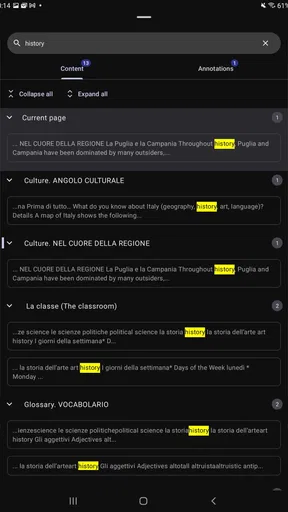
- Search tools make it easy to find terms
- chapters
- and key passages.
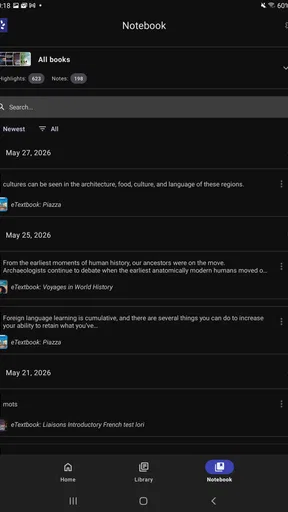
- Bookmarks and notes help organize important study material.
- Works across supported mobile devices for flexible studying.
Cons
- Access usually depends on an active Cengage course or subscription.
- Some textbooks may require an internet connection for full functionality.
- Large digital books can use considerable storage when downloaded offline.
- Reading comfort may be limited on smaller smartphone screens.
- App features and content availability can vary by textbook.
FAQs for Cengage Read
What is Cengage Read, and who is it designed for?
Cengage Read is a digital reading app connected to Cengage learning materials, allowing students to access assigned textbooks and course content on a mobile device. It is mainly intended for learners using Cengage products through a school, college, university, or individual purchase. Available books, tools, and access rights can depend on the course and subscription provided.
Do I need a Cengage account or an access code to use the app?
In most cases, you need to sign in with a Cengage account and have valid access to the relevant digital textbook or learning resource. Some users may receive access through an institution, while others may need to redeem an access code or purchase a product. Before downloading, check your course instructions and confirm that your account includes the title you want to read.
Can I read Cengage books offline after downloading them?
Cengage Read may support downloading content for offline study, which is useful when traveling or when an internet connection is unreliable. However, offline availability can vary by title, license, device, and app version. You may need to open the book online first, and certain features, synchronization options, or account checks may still require an internet connection.
What reading and study features are available in Cengage Read?
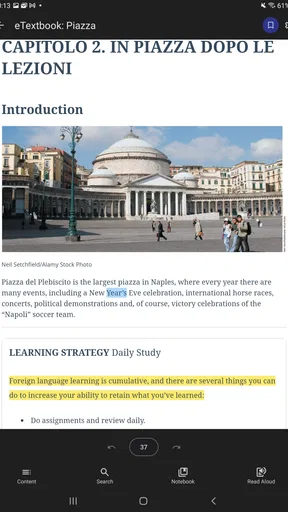
The app is intended to make digital course reading more convenient, with features that may include text navigation, search, bookmarks, notes, highlighting, and adjustable reading controls depending on the material. The exact tools are not necessarily identical across every textbook. Students should also remember that interactive assignments, quizzes, or supplementary resources may be handled through other Cengage platforms.
Is Cengage Read free to download and use?
Downloading the Cengage Read app may be free, but access to textbooks and premium course materials is generally controlled by a purchase, subscription, institutional license, or access code. Installing the app alone does not necessarily provide free access to every book. Review the pricing and expiration details connected to your course before paying, especially if access is temporary.


